That most important input is the wish or intention of the user. If you lose trust, your product is a dud. To perform operations like setting the time, changing the channel, timing the cooking or setting the temperature, you have to choose options that will make the user comfortable.
More to the point, you have to make sure that the user knows how to use those options. Are you going to provide a comprehensive user manual, or are you going to stick to conventions that “everybody knows”? For a light switch, ‘down is on’ in Australia, but ‘up is on’ in the United States.
This is a favourite for cheapness and simplicity, but it is hedged around with problems of its own. If the function is “press for on, press for off” you have to respond instantly to assure the user that another press is not needed.
So what else can you do with it? Well the user can just dab, or press and hold. To switch off a smartphone, or to crash-halt a laptop, you might have to hold a button for ten seconds. So when you have more functions to control, you add more buttons.
On the back of most wall clocks, you can see a row of tiny buttons. Their legends are embossed in the black plastic casing, black on black, too tiny to see without a magnifying glass.
But right now I am holding an alarm clock that projects its time onto the ceiling. Its ivory buttons are on the front, clearly labelled in tiny black symbols. They are:
(torch symbol), “TEMP/FLIP”, “MODE”, (up arrow), (down arrow), “oC oF”
Now I have grown used to holding down a MODE key to switch into settings mode, and can work my way through the sequence of year, month, day, hour, minute, and hour and minute of two separate alarm times. On the way, I have to find out if holding the up button caused values to run up, or if I have to dab away. But how on Earth do I turn those alarms off? I have no clue, so I set their times to 1 a.m. and leave the clock in a room that is out of sleeping earshot.
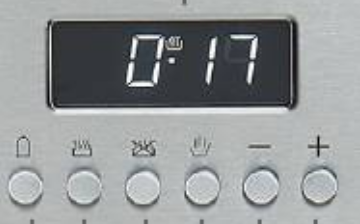
Many cooker timers still have a row of buttons:
They have cryptic symbols to tell you what they mean. At a guess, those here are a ‘minute minder’ alarm, cooking time, finish time, manual on, up and down.
They are virtually the same as they were specified in the early 1980s by a major client who wanted to market timers with the newfangled microprocessors. Texas Instruments were pushing a variant on the very first calculator chip, the TMS1000. The clients wanted every necessary function to be performed by a mask-programmed device that had a mere 1025 ten-bit instructions and four sixteen-nibble registers. Being mask programmed, if we got anything wrong, thousands of chips would be scrapped.
The competitors were having trouble with the ‘day-factor error’, inputting values numerically. If the end-time was set wrongly, cooking would not start until the following day.
With Arthur Collie, I devised an incremental scheme that avoided that. It became a very successful patent, earning more in infringement payments from competitors than in sales.
GB2120815B - Improvements in or relating to programmable timing apparatus - Google Patents – unfortunately there is no PDF.
As the company pushed for enhancements, Texas Instruments kept dropping the price of their feeble chip. With son-in-law Tim now part of my consulting business, we succeeded in persuading them to change to a more powerful NEC chip, that was more like an Atmel microprocessor.
It had sufficient memory that not only were we able to load the chips with the production code, we could also include the next prototype idea, enabled by closing a link.
My wife is a graphic designer, so for a bright new idea we redesigned the seven-segment display, so that words could run across it. After setting, they showed text like “Cooking will start at …”
Have a look at GB2190776A.pdf.
Thousands of display components were manufactured. There were microprocessor chips aplenty, from a production run that already contained the prototype code. It ran without a hitch. You can see a prototype in action here.
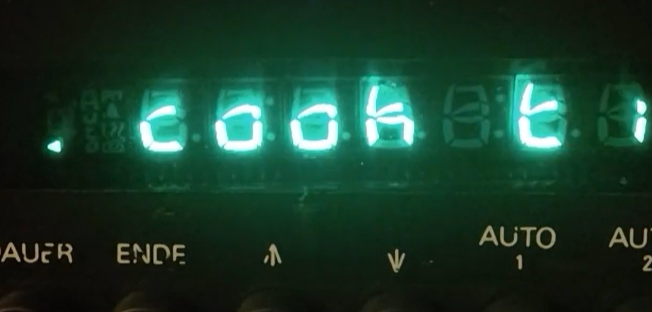
But before it went into production, the client hit financial problems. I just have a fully working prototype.
Of course today there are none of the limitations of seven-segment displays. But would your controller be best to display the setting as text? I predict that soon your new cooker will talk to you, asking you for the setting and then speaking the result. Recognising your spoken command might stretch the power of the microcontroller, but speaking the result is simple.
You have to be my age to remember the days when you walked across the room to turn the clunky “Turret Tuner” to change TV channels. Nowadays a host of devices, even as simple as clocks, come with a ‘zapper’.
First they were ultrasonic, with a click like the locator of a flying bat. (There was a fascinating article about making moths panic with one.) But it was not long before they turned to infrared.
The signal is modulated by two eight-bit numbers. One of these is a device code, locked in by hardware links, the other denotes the function to be performed. Setting the codes on a programmable remote should be simple, but it is not!
Look at the code table in Remote_Manual.pdf
Instead of a myriad of cryptic numbers, first the device code could be given. And there lies another bugbear. If you have devices connected to your TV, like a PVR, DVD player or VHS (remember them?) and if they are from the same manufacturer, they are all likely to respond to the same device code with confusing consequences.
But then there will be a limited number of patterns used for the function buttons.
Now the zapper is being reborn in a form that uses BlueTooth, and even has voice input!
Have a look at LG Smart TV_ Online User Guide.html
The restrictions of the two-byte code have gone, but now there are a host of other problems. In that user guide you will see that the inertial sensor in the device now gives the possibility of using ‘gestures’. But will the user know what they are? “If all else fails, read the instructions,” but who does?
Gestures come into their own when using the touch screen of a tablet. You are used to using a keyboard, and find yourself desperately asking, “What is the gesture equivalent of ctrl-Z ?”
But there’s more! In addition to taps, double-taps, holds and swipes, you now have to teach the purchaser how to use two, three and even four-finger swipes.
Youngsters might regard getting acquainted with these to be a ‘rite of passage’, but a lot of users will remain baffled.
Automated manufacturing has turned pricing on its head. Prices used to be determined by a percentage markup on the manufacturing cost. Now they are dwarfed by the ‘customer acquisition cost’. The price is set by the quality of the advertisement, which is why fortunes are made by those at the head of marketing, and by social media influencers.
If your wonderful new idea simply involves software, the cost of adding it to your product is zero, if you discount the substantial legal expense of protecting your patent. Even if hardware is involved, it can be churned out at a tiny price. Look at the amount of mechatronics that goes into a bubble-jet printer, available for a mere sixty dollars. Does that refute my argument about pricing?
No, because as soon as the trial cartridges run out of ink, the purchaser is locked into buying refill cartridges for life. A pair of cartridges, black and colour, cost twice the price of the printer.
The value of your idea rests solely on the ‘zing’ that it can add to its advertising.
As a creative engineer, you will have the urge to thrust your brilliance onto the purchaser, adding every clever feature that you can imagine. But you can go too far. Not only will you have to teach the user how to use those features, you will be at the mercy of the writer, probably an Arts graduate, who will put your instructions into the prose of the user guide.
I bought a Fujitsu air-conditioner. Not only can you set on and off times, you can program four events such as temperature changes, for every individual day of the week
Look at the user manual Fuj-astg09_12kmca-operating-manual.pdf, turn to the section on ‘Weekly’ settings, and see how clear it is to you. And you are training as an engineer!
More and more, YouTube is filling up with videos for those who cannot understand the manuals. And most of those videos do not help much, either, put there to collect the cents-per-click of their sponsored advertisements.
Many gadgets plug into the USB port of your laptop, appearing in ‘device manager’ as devices, maybe as a HID. But they could also appear as memory drives, replete with all the instructions and video necessary to delight the purchaser. ‘Artificial Intelligence’ is all the rage now, but all that is needed is well-written code to hold a dialogue with the user. Memory is extremely cheap.
Bear KISS in mind, ‘Keep it simple, stupid!”